
Latest News
ANNUAL ENROLLMENT FOR AMEREN BASIC PLAN PARTICIPANTS OPEN NOV. 17-DEC. 1
Annual Enrollment will be open for Ameren Basic Plan participants, from Nov. 17 – Dec. 1.
If you have questions regarding the pharmacy coverage change, please refer to the Pharmacy FAQ (attached), which will be available on the Benefits and Pay Hub in Workday.
In addition, the Benefits team will host the following “Navigating Annual Enrollment” sessions via Teams to answer questions about healthcare and life options:
• Nov. 19, 7 a.m.
• Nov. 24, 12 p.m.
Registration is available in Insight (see attached flyer), and a recording of this session will be posted to the Workday Benefits and Pay Hub.
If you require assistance, please call Ameren Benefits at 877.769.2637, Option 2. Ameren Benefits is available Monday through Friday from 7 a.m. to 7 p.m. CT and Saturday, November 21, from 8 a.m. to 2 p.m. CT.
Ameren Benefits will be closed Thursday, November 26, for Thanksgiving.
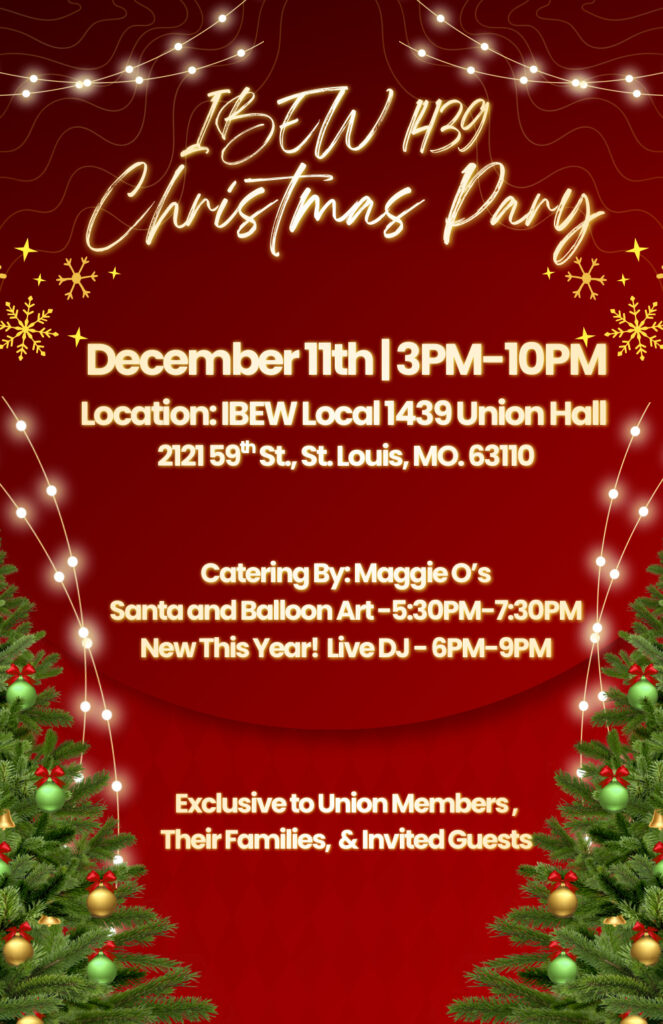
1439 Christmas Party
Ameren DORP App Guide
View the guide below for step-by-step instructions on setting up direct deposit and submitting a claim through the Ameren DORP app.
Powered By EmbedPress
IBEW LOCAL 1439 MOBILE APP
Click HERE for access to the new Local 1439 Mobile App. Instructions to access the QR code are below. Both platforms require you to screenshot the PDF with the QR code on it.
IPhone:
Open the Image: Go to your Photos app and tap on the picture or screenshot that contains the QR code.
Long-Press the Code: Press and hold your finger directly on the QR code within the picture.
Tap the Action: A pop-up menu will appear, usually showing the link or content of the QR code (e.g., “Open in Safari” or “Open [App Name]”).
Access the Content: Tap the relevant action to open the website, app, or view the decoded information.
Android:
Open the Image: Open your Gallery or Google Photos app and select the picture that contains the QR code.
Activate Google Lens: Look for and tap the Google Lens icon (it looks like a small camera or a colored square) usually found at the bottom of the screen.
Scan the Code: Google Lens will automatically analyze the image, detect the QR code, and display the associated information or link.
Access the Content: Tap the link or the displayed content to open the website, view the text, or take the relevant action.
MATT KOPECKY, FINANCIAL SERVICES REPRESENTATIVE
Matt is a financial advisor who is familiar with all Ameren benefits and retirement questions. He works for Union Financial, Inc.
625 Maryville Centre Dr.
St. Louis, MO 63141
Cell: 314-495-9166 [email protected] www.unionplanning.com